Clipping software
| Clipping Software | Pro | Cons | Rating |
|---|---|---|---|
| OBS Replay Buffer | Full control of quality Free for Everyone! |
Can be daunting for new users to setup If you forget to launch OBS or stop the buffer you can't clip. |
9/10 |
| Nvidia Shadowplay | Ease of use |
Buggy Can't debloat Nvidia drivers completely (Refer to Nvidia GPU Optimizations) No in-depth control of settings Only on NVIDIA GPUs |
6/10 |
| AMD Software | Ease of Use | Only for AMD GPUs No in-depth control of settings |
6/10 |
| Medal | Ease of use | Bloated ( Uneccesary features) Freemium; if not paid you have watermarks, Ads No in-depth control of settings |
4/10 |
| Discord clips (yes it exists) | Ease of use | Paid (needs Nitro) No in-depth control of settings |
7/10 |
If someone were to ask me personally of what they should use, I'd say OBS Replay Buffer.
Why you may ask? It provides the most about on control and allows you to fine tune many settings which you can't on other clipping software.
Although It might seem daunting to setup, I'm going to provide the settings and teach you what to change depending on your computers specifications. If you do not care about clip quality as much, I would highly suggest using NVIDIA's or AMD's software to clip, according to your corresponding brand of GPU.
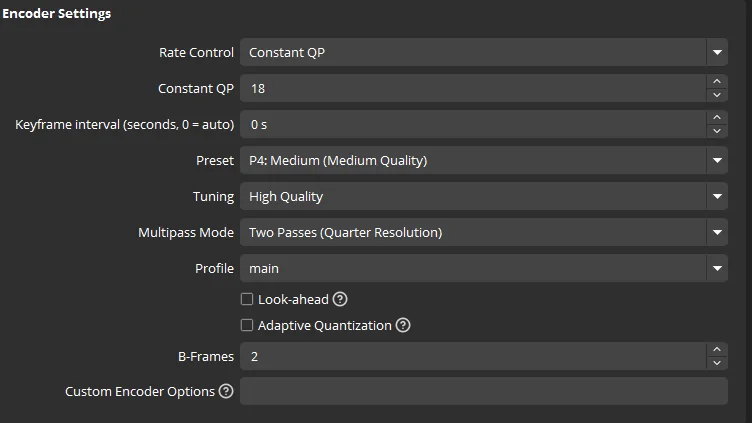
These are good settings for most modern day systems.
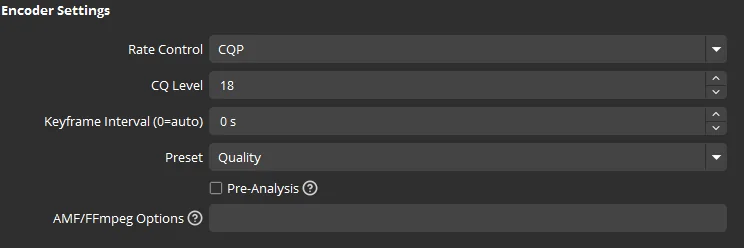
Note: AMD GPU users, Search up the equivalent of your GPU in NVIDIA and use those settings (I will implement settings for AMD users soon)
Lower series cards such as the 2060, 3060, 4060, 5060, should stay around Constant QP 19-18
Mid series cards such as the 2070, 3070, 4070, 5070, should stay around Constant QP 18-16
Higher Series cards such the 2080, 3080, 4080, 5080 should stay around Constant QP 17-15 while the 3090, 4090, 5090 can push up to Constant QP value of 15-12.
Note: 20xx,30xx, cards should stay at the lower end of the Constant QP (CQP) values while the 40xx & 50xx, can stay at the higher side, although I would highly recommend 40xx cards staying in the middle value.
The lower the Constant QP value, the higher quality, lower the performance essentially.
NVIDIA Settings

AMD Settings